 DQ9 Encyclopedia
The game's Wi-Fi shop, Sellma's DQVC at the Quester's Rest in Stornway, closed in 2014. The small program on this page brings it back on your PC, offline: it plays the part of Nintendo's and Square Enix's servers. Tried end to end on 04/10/2026. The program's messages are in French; the steps below explain them.
What you get
- All 52 weeks of the DQVC (2010-2014 calendar, original prices), with a different week every hour. As back then, Sellma offers 6 items drawn at random from the week's list.
- The original stock when known (files sent by Nintendo in May 2014, kept on archive.org); otherwise a rule taken from those files: 1 for equipment, 1 to 3 for items, 3 to 5 for materials.
- The 64 downloadable quests and the 23 special guests, as on the last possible connection in 2014.
- Connect at any time: the game only allowed one connection a day.
Before you start
- melonDS installed, controls set, and your ROM: see Playing on PC.
- Be far enough in the story: Sellma sets up her counter from Alltrades Abbey on.
Step 1: install Python (once)
- Open the Start menu, type Microsoft Store, open it.
- Search Python 3.13, pick the one by “Python Software Foundation”, click Get.
- Or: python.org/downloads, yellow download button, then follow the installer.
Step 2: prepare the folder (once)
- Click the two buttons above: the files land in your “Downloads” folder.
- Create a folder, e.g. “DQVC” on the Desktop, and move both files into it (they must stay together).
Step 3: start the DQVC
- Double-click Lancer la DQVC.bat (French for “start the DQVC”). If Windows says “Windows protected your PC”: More info → Run anyway.
- A black window opens. The first time, it asks for your ROM: open the ROM's folder in File Explorer, drag the .nds file with the mouse and drop it into the black window (its path types itself), then press Enter.
- The program creates, next to your ROM, a copy “… (DQVC).nds” (your original ROM is untouched) and copies your save. The window then shows roughly:
Copy created: C:\Users\You\Desktop\DQ9\DQ9 (DQVC).nds
Save copied: C:\Users\You\Desktop\DQ9\DQ9 (DQVC).sav

DQVC ready. Week 14/52: "Dragon Extravaganza", 43 min left.
Open the "(DQVC)" copy in melonDS and talk to Sellma. DO NOT CLOSE this window while playing.
(The messages follow the language of Windows: English, or French on a French Windows.) Keep this black window open (you may minimise it): it is the server. Closing it stops the DQVC.
Step 4: open the copy in melonDS
- In melonDS: File → Open ROM… and pick “… (DQVC).nds”, not the original ROM.
- Nothing to set for Wi-Fi: Config → Wifi settings must stay on “Indirect mode (uses libslirp, recommended)”, the default.
- Carry on with your adventure as usual.
Step 5: talk to Sellma
- Go to Stornway and enter the Quester's Rest. At the big ground-floor counter stand, left to right: Patty, Erinn, the Krak Pot, Sellma (green dress) and Pavo (the wings).
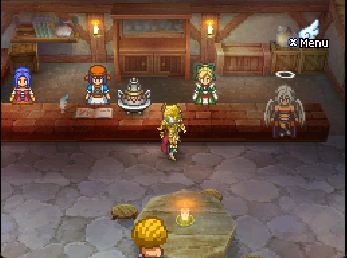
- Stand facing Sellma, across the counter, and press A.
- She welcomes you, warns that she'll update your adventure log (a save), then asks “Connect to Nintendo Wi-Fi Connection?” → Yes.
- The game connects, downloads, then shows “Data successfully downloaded.” Lines appear in the black window as the DS connects.
- The game saves. The first time it also announces new quests and a very special visit at the Quester's Rest (the special guests).
- Sellma gives the hour's news, then shows the 6 items: price in gold, stock on the far right.
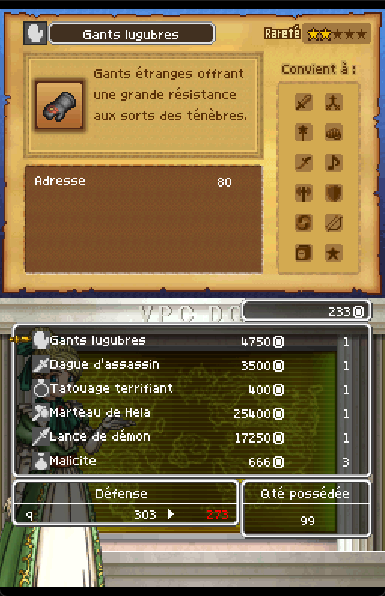
- To buy: pick the item with the D-pad (or touch it), A, confirm, then choose who carries it. B to leave.
- Come back the next hour for a new week: just talk to Sellma again (6 new items are drawn on each connection).
Next times
- Double-click Lancer la DQVC.bat, then just press Enter (the copy already exists).
- In melonDS, open the (DQVC) copy and talk to Sellma.
You can play the whole adventure on the (DQVC) copy: only the connection changes. Your save still works with the original ROM.
If it doesn't work
- “Python 3 was not found” in the black window: do step 1, then start the .bat again.
- “Port 80 is already taken”: another “Lancer la DQVC” window is open (close it), or another server program runs on the PC.
- The game says you can only connect once a day: you're playing the original ROM. Open the (DQVC) copy.
- Download failed, or nothing appears in the black window: check it's open and that Config → Wifi settings is on “Indirect mode”, then talk to Sellma again.
- Sellma isn't at her counter: you're not far enough in the story yet (Alltrades Abbey).
- To not receive the quests and special guests: open
dqvc_local.pyin Notepad and replaceQUETES_ET_CELEBRITES = TruewithFalse.
Nothing goes to the internet: the game talks to the program through melonDS's internal network. For speedrunners: a successful connection advances table B by 6 (the stock of the 6 items) and table A by at least 6 (the item choice); see The game's randomness.