 DQ9 Encyclopedia
DQ9's multiplayer was never online: it links consoles sitting side by side. melonDS imitates it by running two consoles on the same PC, each in its own window. Tried on 04/10/2026: the guest arrives in the host's world and each sees the other.
Before you start
- melonDS installed and your game working: see Playing on PC.
- Both games must have reached Stornway: that's where Pavo, who opens the worlds, is.
Step 1: open console 1
- Start melonDS and open the game (File → Open ROM…). The window title starts with [p1]: that's console 1.
Step 2: open console 2
- In window [p1]: System menu, Multiplayer at the very bottom, then Launch new instance.
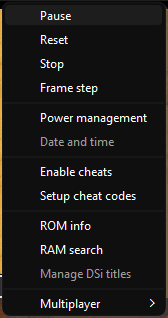
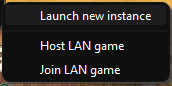
- A 2nd, black window opens; its title starts with [p2]. In that window: File → Open ROM… and pick the same file.
- Console 2's save: nothing to do, it starts from a copy of your game (melonDS then keeps it apart in
NAME.sav.2next to the ROM). To play with a friend's game: before step 2, put their save next to the ROM, renamedNAME.sav.2(the ROM's name, then.sav.2).
Step 3: console 2's controls
- The 2nd window has its own settings: in window [p2], Config → Input and hotkeys (it says “Configuring mappings for instance 2”) and set its keys as for the 1st.
- The keyboard drives the window you clicked last: click the other window to switch players.
- To play at the same time: plug in a gamepad and set it in the 2nd player's window (Joystick mappings). Not yet tried with two simultaneous players.
Step 4: in the game
- In each window, go to the Quester's Rest in Stornway and talk to Pavo, at the end of the counter (the wings, right of Sellma). The first time, Pavo introduces the Rapportal: answer the questions.
- Host window first (the player who welcomes): choose “Invite friends from other worlds.” Pavo saves and opens the Rapportal.
- Then the guest window: choose “Visit another world.” Pavo searches, then asks “Do you wish to venture into the world of …?” → Yes.
- In the host window, press A to finish Pavo's messages: the guest arrives. Top screen: two name tags; bottom: both heroes.
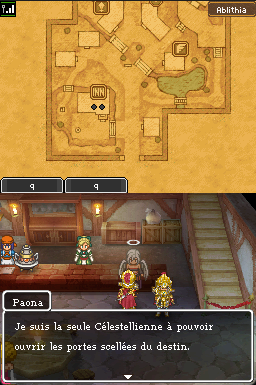
- To go home, the guest uses the watcher's wings Pavo gave them.
If it doesn't work
- Pavo finds no world nearby: the guest searched before the host opened the Rapportal. Do the host first, then talk to Pavo again on the guest side.
- The 2nd window ignores keys: set its controls (step 3) and click it before playing.
- The game lags: two emulated consoles need about twice the PC power. Close other programs.
Between two PCs
- On the same home network: System → Multiplayer → Host LAN game on one PC, Join LAN game on the other. Not tried with DQ9 yet; a network cable is better than Wi-Fi.
- Over the internet: melonDS waits at most 25 thousandths of a second for the other console's answer, and an internet link often exceeds that. With a free virtual private network (Tailscale, ZeroTier) it may work between nearby friends, with no guarantee. A true online version will mean rewriting how the game exchanges its data: a medium-term project of this encyclopedia.